This article is also published in many bookstores for the benefit of offline readers. The eBooks are DRM-free, while the printed editions compile multiple articles and feature original photography at full resolution.
You can find printed compilations here, and eBooks at Amazon Kindle, Apple Books, Kobo and other stores. The proceeds support the improvement of current articles and the development of new ones.
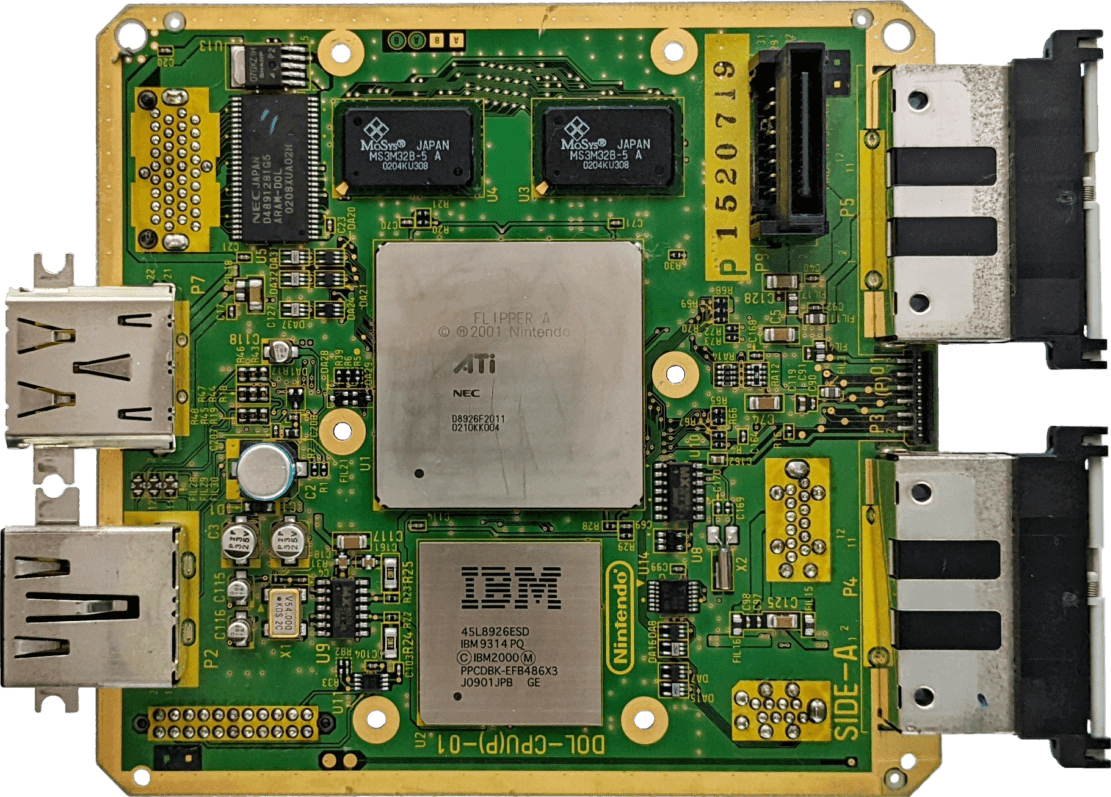
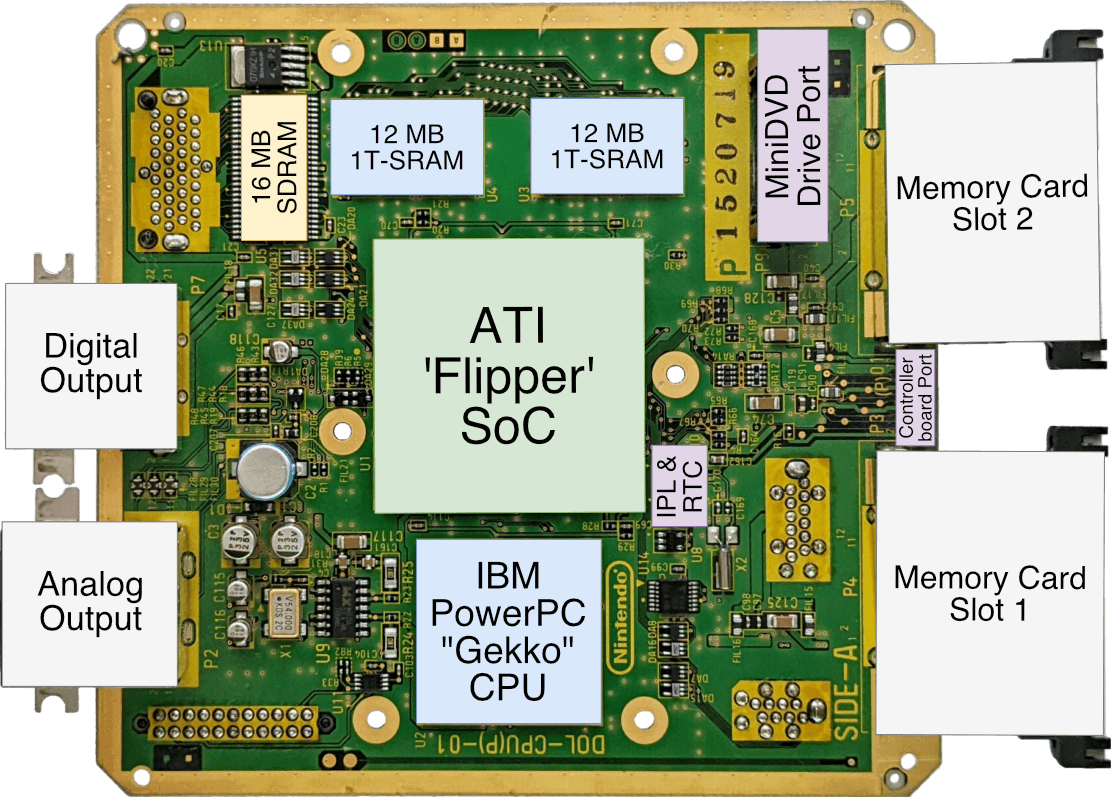
Motherboard Taken from my 'DOL-CPU(P)-01' model, later revisions removed the Serial Port 2 and Digital Output. The encoder chip, expansion, controller, and power socket are found on the other side.Motherboard with important parts labelled
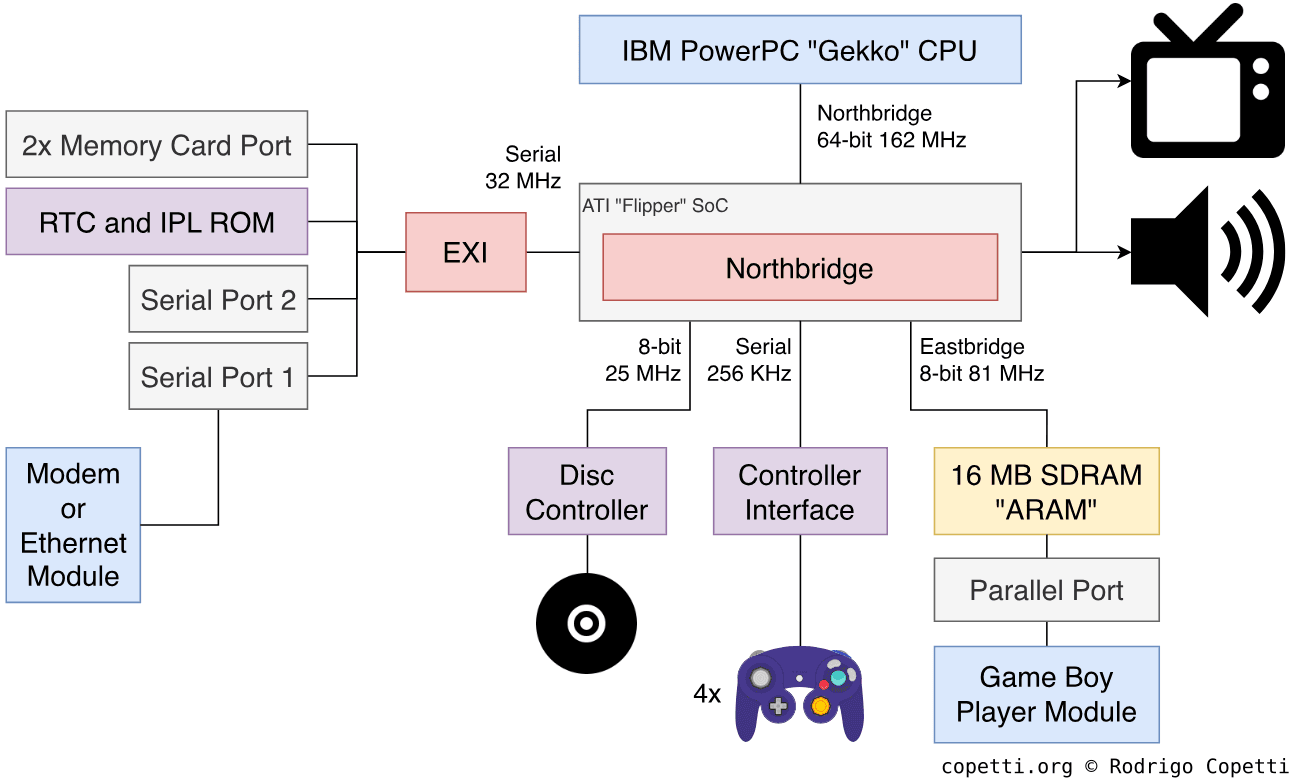
DiagramMain architecture diagram Each data bus is labelled with its width.
A quick introduction
Gone are the days of ‘3D attempts’. Nintendo’s new offering marks a clean and powerful break from its predecessor that will open the door to new, original and unprecedented content.
It’s worth pointing out that this architecture resulted in one of the most compact hardware designs of this generation, emphasised by the absence of Slim or Lite revisions.
CPU
After the loss of Silicon Graphics’ dominance in the graphics market, Nintendo needed new players to partner with.
A promising candidate seems to be IBM: apart from their recognised work on mainframes, they recently joined forces with Motorola and Apple to create a CPU powerful enough to compete with Intel’s ruling in the PC market. The resulting product is a series of processors carrying the name PowerPC, which were selected to power 99% of Apple’s Macintoshes, IBM’s workstations, and some embedded systems.
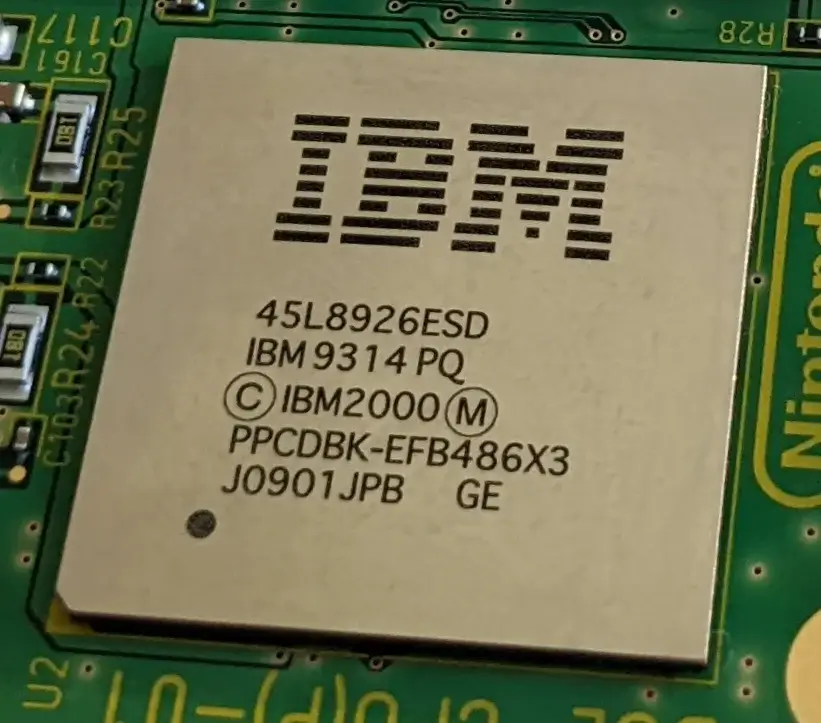
The PowerPC Gekko chip. This is what the GameCube houses.
To understand what this means for the GameCube, let’s first take a look at the chain of innovation that culminated in the PowerPC CPU.
The origins of PowerPC
IBM was one of the three early forces pushing the emerging RISC CPU design into the mainstream market. During the 80s, while Berkeley was busy developing the ‘RISC CPU’ and Stanford academics had just founded MIPS, IBM had already produced the 801 and ROMP CPUs. These were groundbreaking yet commercially-unsuccessful silicon implementing a set of guidelines later known as the ‘RISC model’ [1].
Entering the 90s, IBM tried again with a new series of UNIX workstations called ‘IBM RS/6000’, and within it, a new in-house RISC CPU: POWER1. With a focus on instruction-level parallelism, the latter featured attractive advancements such as [2]:
A complete 32-bit instruction set called POWER.
A 64-bit Floating-Point Unit (FPU).
A Harvard cache architecture, which segregates data and instruction space to increase bandwidth.
The ability to execute two instructions at the same time. This is done by distributing them across its three separate units (branch, fixed-point, and floating-point). Hence, POWER1 is recognised as being two-way superscalar.
Static branch prediction, which turns control hazards into opportunities for accelerating execution.
Out-of-order execution of floating-point operations, through register renaming[3]. All in all, this greatly raises the number of instructions the CPU executes per clock cycle (and takes care of data hazards).
The core design originated in IBM’s mainframe era, when it was introduced as Tomasulo’s algorithm and subsequently implemented on the IBM System/360 (1966). With POWER1, IBM managed to bring part of it to workstation equipment.
Nevertheless, the POWER1 CPU was a large and expensive package composed of multiple chips. So, for their follow-up venture, IBM shrank down its design to fit in a single chip. While still POWER-compliant, this came at the cost of housing a 32-bit FPU, a von Neumann cache architecture, and reverting to in-order execution. The new chip was called RISC Single Chip (or ‘RSC’) and shipped with the low-end line of their RS/6000 workstations.
IBM’s POWER development board (1992), formerly used by Apple, now exposed at the Computer History Museum (Mountain View, California).
In the midst of these developments, IBM also agreed to join forces with Apple and Motorola to challenge the Intel-Microsoft monopoly in the desktop market, forming the AIM alliance. Thus, a new project was conceived to produce a competitive CPU in the low-end arena. This would incorporate intellectual property from the three companies, including:
IBM’s RSC processor design.
Motorola’s bus architecture (found in their in-house RISC processor, the Motorola 88110).
Apple’s and Motorola’s understanding of end-user needs.
Keith Diefendorff, a member of the Motorola 88110 team, was recruited as the lead architect and, in 1993, the project culminated in the following creations:
The PowerPC instruction set: A subset of POWER, with additional instructions for multiplication, support for a symmetric multiprocessor layout, and an optional 64-bit mode.
From then on, IBM’s POWER CPU line would implement the PowerPC Instruction Set Architecture (ISA) instead. This was first apparent with the release of the POWER3 in 1998, a high-performance CPU implementing the 64-bit PowerPC specification.
We won’t see a symmetric multiprocessor setup in this article series until the Xbox 360 and Wii U arrive.
The PowerPC processor family, a new line of desktop CPUs implementing the PowerPC ISA, beginning with the PowerPC 601. This was a cost-effective version of the RSC microarchitecture.
Motorola also dropped development of the 88000 CPU altogether to focus on this new series.
To ensure the new line would be both technically competitive and commercially viable, the PowerPC 601 attempted to bring certain advancements in instruction parallelism to the masses, to name a few [4]:
The implementation of both POWER and PowerPC ISAs, to assist POWER developers in transitioning to PowerPC.
Three-way superscalar execution using three separate execution units (FPU, branch, and ALU) [5]. An improvement over previous designs.
Based on Motorola’s model, a new bus design called the Bus Interface Unit, providing:
A 64-bit data bus and a 32-bit address bus, the former of which is critical for taking advantage of the superscalar capabilities.
Burst transactions, enabling the transfer of 32 bytes of memory (the size of L1 cache) using a single instruction [6].
Memory Management Unit (MMU), offering virtual memory within the same package.
For end users, this new CPU was subsequently found in IBM’s lower-end RS/6000 series and Apple’s new line of Macintosh computers, called Power Macintosh.
Once the 601 shipped, Motorola and IBM decided to work separately on the follow-up generation. This would be a pure PowerPC implementation (removing traces of the POWER ISA) materialising as two separate product lines [7]:
The low-end PowerPC 603, headed by Motorola, was designed for the portable market. In doing so, it delivered a smaller L1 cache (now based on the Harvard architecture), two additional execution units, and no multiprocessor support. The design decisions resulted in an overall consumption rate of 1.8-2.0 watts [8].
The high-end PowerPC 604, headed by IBM, prioritised performance. In exchange for a premium price and high power consumption (14.5-18.5 watts), it provided advanced parallelism capabilities (à la MIPS), such as four-issue execution, the return of out-of-order execution, dynamic branch prediction, and multiprocessor support [9].
Even though the 603 should have shone for its power efficiency, existing business applications ended up eclipsing its novelties. For instance, Apple’s software architecture was still relying on emulating 68000 instructions, which bottlenecked the 603’s small cache size.
As a side note, IBM also developed the PowerPC 4xx series, conceived as a microcontroller solution rather than a desktop CPU [10]. The 4xx series bundled smaller cache and omitted sophisticated modules such as the MMU and FPU. However, their variants were offered as a customisable package to tailor them to the manufacturer’s needs. That being said, while the 4xx is not of particular interest to this article, a famous competitor did adopt it for secondary tasks.
Ultimately, the second generation of desktop PowerPC chips was deemed either too expensive or downright uncompetitive against Intel. Thus, Apple got IBM and Motorola to collaborate again on a new unified generation that brought out the best of both worlds. The energy-efficient 603 was chosen as the foundation for the new design. To improve upon this basis, certain key decisions were made:
Addressing its limitations by providing a larger cache and higher memory bandwidth.
Incorporating design ideas from the 604, such as dynamic branch prediction and out-of-order execution (limited to memory operations, for now).
Implementing new enhancements, such as an extra ALU for greater parallelism.
This became the 750 line, popularised by Apple as the PowerPC G3. From then on, IBM and Motorola continued working on variants and enhancements of the 750. These focused on greater clock speeds, larger caches, and a smaller fabrication process.
Interestingly, it is always the most energy-efficient CPUs that manage to weather developmental turmoil, as others (MIPS, Intel, and ARM) would later corroborate.
As time passed, the three companies became increasingly distant. Two years after the PowerPC G3 was unveiled, Motorola delivered by itself a new line called the 7400 (which Apple named the G4). This featured a 64-bit FPU, a faster bus architecture called ‘MPX’, and a set of Single Instruction Multiple Data (SIMD) instructions called ‘Altivec’. Despite its popularity in the desktop market (thanks to Apple), IBM only devoted attention to its exclusive POWER CPU line.
Years later, in 2003, Motorola finally gave up on the CPU business and divested its semiconductor division, leading to the incorporation of ‘Freescale’. The latter wasn’t interested in working on PowerPC chips either, and so the AIM alliance came to an end. Nevertheless, Apple still needed new CPUs, so IBM continued the line of succession by repurposing their POWER4 design and scaling it down, resulting in the PowerPC 970 CPU (also called the ‘G5’).
And this is where the history section ends. Thus, it’s time to take a look at the GameCube’s unique CPU (which sits chronologically between the 750/G3 and the 7400/G4). I will now be focusing on the GameCube hardware, but if this detour piqued your interest, you may want to read the PlayStation 3, Xbox 360, and Wii U studies next.
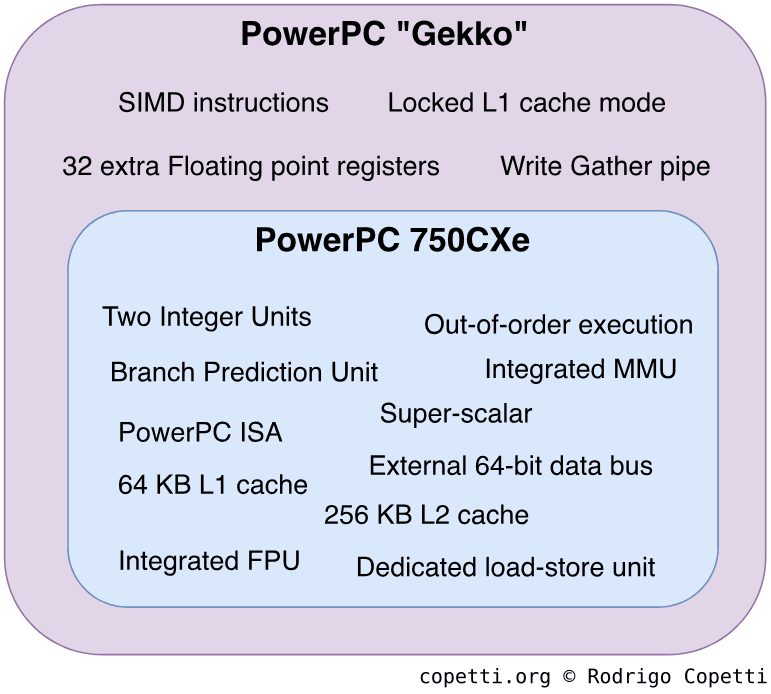
Back to the year 2001, Nintendo required something powerful yet cheap. So, to comply with these red lines, IBM grabbed one of its past designs - an enhanced G3 called the PowerPC 750CXe (featured in the late iMac G3 revision, known as the Early-Summer 2001 model) - and beefed it up with capabilities that would please game developers. The result was the PowerPC Gekko and runs at 486 MHz.
Construction of Gekko.
Let’s find out what makes Gekko so special; to do this, we must first look at the offerings of the 750CXe. Now, having gone through the history of PowerPC, you may find that a lot of this information overlaps with previous designs (that’s the point of these studies!). With that in mind, the 750CXe offers [11]:
The PowerPC ISA: This comes as no surprise. The only additional detail is that the 750CXe implements the v1.10 specification.
External 64-bit data bus: As you’ve seen before, while the ISA can operate within a 32-bit bus, the CPU still needs to move wider chunks of data without hitting performance penalties.
Triple-issue superscalar: If the required units are available, the CPU may process up to two instructions at the same stage of the pipeline. In the case that the queue includes a branching instruction, the number of possible concurrent instructions is raised to three.
Out-of-order execution: The CPU can reorder the sequence of instructions to keep all of its execution units busy, thus increasing efficiency and performance.
Two Integer Units: Combined with the superscalar and out-of-order model, this improves the number of integer operations done per unit of time.
Integrated FPU with 32-bit and 64-bit registers: Accelerates operations involving floats and doubles.
A four-stage pipeline as a basis: I’ve previously introduced pipelining if you want to know more. In the 750CXe, FPU operations are divided into seven stages, while load-store operations are divided into five.
All in all, this boosts the instruction throughput without getting out of hand.
Additionally, this CPU includes dedicated units to speed up specific computations [12]:
Branch Prediction Unit: When evaluating a condition (to determine whether the CPU should take path ‘A’ or path ‘B’), the CPU speculates (follows one of the paths based on previous executions) and then evaluates the condition. If the prediction happens to be right, the CPU has saved some time; otherwise, it discards the prediction and follows the correct path.
Dedicated load-store unit: Separates the units that manipulate registers from those handling main memory.
Integrated Memory Management Unit: Interfaces all memory access from the CPU.
Previous consoles included this component as a separate co-processor. Now, the MMU is found inside the same chip, reducing manufacturing costs.
And, of course, some cache is also included to increase memory bandwidth:
64 KB L1 cache: Divided into 32 KB for instructions and 32 KB for data.
256 KB L2 cache: It’s unified, allowing to store both instructions and data.
IBM’s enhancements
While the previous set of features was highly appreciated compared to previous generations, this CPU still falls behind its contemporaries in gaming performance (let’s not forget that this is still a general-purpose CPU, good at spreadsheets but average at physics). To compensate, IBM introduced the following tweaks to constitute Gekko [13]:
Enhanced instruction set with 50 new SIMD instructions: These operate on two 32-bit floating-point numbers or a single 64-bit floating-point number in just one cycle. Consequently, these new SIMD instructions speed up vector calculations, proving particularly useful during geometry transformations.
These should not be confused with Motorola’s SIMD extension (AltiVec), which shipped with the PowerPC 7400/G4. They are mutually incompatible. Curiously enough, IBM did eventually implement AltiVec into its POWER4 CPU and, by extension, into the 970/G5 series, Cell, and Xenon.
32 floating-point registers: These come with the new SIMD instructions.
Write Gather pipe: A specialised memory writing mechanism available to use. When enabled, instead of performing single-beat transfers, it holds all memory write requests in a 128-byte buffer until it’s 25% full, then performs the requested writes using a technique called ‘burst transaction’, which can move blocks of 32 bytes of data at once.
As you can imagine, this conserves significant bandwidth by making full utilisation of the available buses.
Locked L1 cache: Programs can take 16 KB of L1 data cache for use as ‘scratchpad’ (incredibly fast memory).
Apart from handling the game logic (e.g. physics, collisions, etc.), these enhancements allow the CPU to implement parts of the graphics pipeline (e.g. geometry transformations, lighting, etc.) with acceptable performance. This is crucial because the GPU can only accelerate a limited set of operations, so the end result is not conditioned by the GPU’s limitations.
A step forward or a step backwards?
On your Nintendo 64 article, you explained that the system has a 64-bit CPU, but the GameCube one is 32-bit. Did Nintendo downgrade their console?
Indeed, Gekko implements the 32-bit PowerPC specification, whereas the MIPS R4300i can switch between 32-bit and 64-bit modes. To answer whether this is an improvement or not, you have to ask yourself: Why would you need ‘64-bitness’?
To address more than 4 GB of memory: The GameCube doesn’t feature nearly that amount of memory locations, so this is not a requirement.
To operate larger chunks of data using fewer cycles and less bandwidth: This is covered by Gekko’s new SIMD instructions, its 64-bit FPU and data bus, and the Write Gather pipe.
To come up with more marketing buzz: Yeah… I don’t think that persuades people anymore.
As you can see, the GameCube already enjoys the advantages of 64-bit systems without being called a ‘64-bit console’. This is precisely why you and I can’t summarise complex machines by their number of bits.
Clever memory system
During the design of the next-generation architecture, Nintendo’s architects performed a post-mortem analysis of their previous design and discovered that combining a Unified Memory Architecture (UMA) with high-latency components (i.e. RDRAM) resulted in one of the most severe bottlenecks (almost 50% of CPU cycles were wasted idling) [14]. Moreover, the inclusion of multiple independent units contributed to a concerning competition for the memory bus.
For that reason, the GameCube’s architects came up with a new memory system strictly based on providing dedicated memory space and using low-latency chips. Under the new design, the CPU and GPU no longer compete for the same RAM (which previously caused fill-rate issues), as the GPU was now equipped with its own internal and amazingly fast memory. On the other hand, the GPU is still in charge of arbitrating access to I/O.
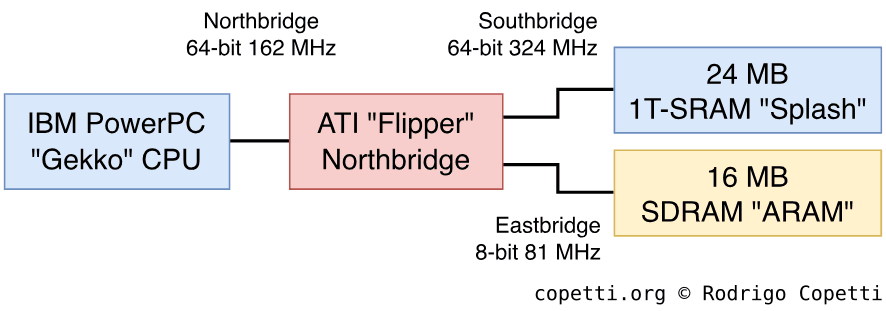
Memory layout of this system.
The result was a system organised around two main buses:
The Northbridge: It’s 64-bit wide and connects the CPU to the GPU. It runs three times slower than the CPU clock, meaning tasks must be optimised to minimise reliance on the GPU. Other components, like Direct Memory Access (DMA) and cache, may come in handy.
The Southbridge: It’s also 64-bit wide and connects the GPU to 24 MB of 1T-SRAM called ‘Splash’. The bus runs at twice the speed of the GPU, presumably to enable the GPU to maintain steady bandwidth between the CPU and main memory.
1T-SRAM is made of DRAM (which is the most popular type, being both cheaper and slower); however, it’s enhanced with extra circuitry to behave like SRAM (which is faster and more expensive, mostly used for cache).
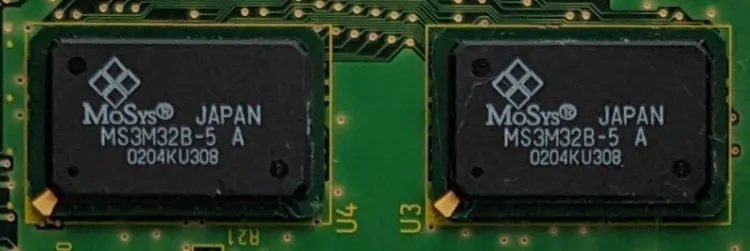
The two 1T-SRAM chips housing 12 MB of each.
Additionally, this design contains a further (yet unusual) bus where more memory can be found:
The Eastbridge: It connects the GPU to another memory chip called Audio RAM or ‘ARAM’ [15]. It provides 16 MB of SRAM available for general use, which is quite substantial for spare memory. However, the bus is not accessible via conventional means (i.e. memory addresses). Instead, it’s connected to an 8-bit serial endpoint (clocked at half the speed of the GPU and a quarter of the CPU’s), which is only accessible through DMA.
Overall, this means that, while ARAM provides a considerable amount of RAM, its use is in theory limited to less critical tasks, such as acting as an audio buffer or being used by certain accessories (explained in the I/O section).
Making the most of ARAM
So far, we’ve seen that, on paper, the memory capabilities are undoubtedly superior to those of its predecessor, but there’s still room for improvement. For instance, Nintendo could’ve fitted a bit more circuitry to incorporate ARAM into the CPU’s memory map.
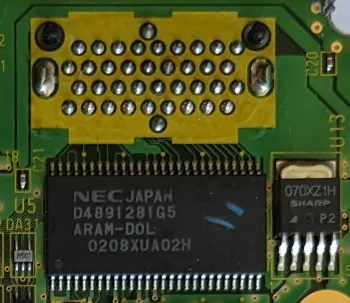
The ARAM chip, underneath the ‘Hi-Speed’ port pins.
On a related note, let’s revisit the MMU used in Gekko. The CPU, with its 32-bit address bus, can access up to 4 GB of memory, but the system houses significantly less than that amount. Therefore, are those memory addresses wasted? No, because the CPU delegates addressing to its MMU, which in turn provides a virtual address space that abstracts physical addresses behind a safer, easily cacheable, and contiguous memory layout [16].
To make this work, Gekko (and other PowerPC architectures) translates virtual addresses into physical ones using the following process:
Perform Block Address Translation (BAT): There are eight pairs of programmable registers (four for data and four for instructions) where each pair maps a range of virtual addresses to a contiguous range of physical addresses. The MMU attempts to find the physical address to determine whether it falls within those ranges.
If BAT doesn’t work, read the Page Table: The MMU also maintains a table that catalogues the physical location of pages (blocks of virtual addresses).
The MMU takes time to read a page table, so a Translation Lookaside Buffer (TLB) is included to cache recent translations.
Other architectures, such as x86 or MIPS, provide paging as well, though not all of them offer a TLB.
Finally, if the requested virtual address still cannot be translated, the MMU triggers a ‘page fault’ exception in the CPU, allowing the operating system to decide what to do next.
So, what practical use does this have for developers? Well, it turns out that Nintendo released some libraries that extend main RAM using ARAM with the help of paging. To recap, ARAM is not directly addressable, but the CPU may call DMA to fetch and store data there. Thus, the CPU can move pages out of main RAM to make room for other resources and temporarily store them in ARAM. Afterwards, whenever a page fault occurs, the OS employs routines to look for the missing pages in ARAM and restore them to their original location in main RAM.
In conclusion, through some clever tricks, these general-purpose capabilities enabled GameCube games to enjoy more memory than was technically allowed, thereby reaching higher levels of quality. However, it’s important to bear in mind that such tricks may incur performance penalties if they’re taken for granted.
Graphics
This is one of the most critical components of this console; it essentially makes the GameCube, a GameCube.
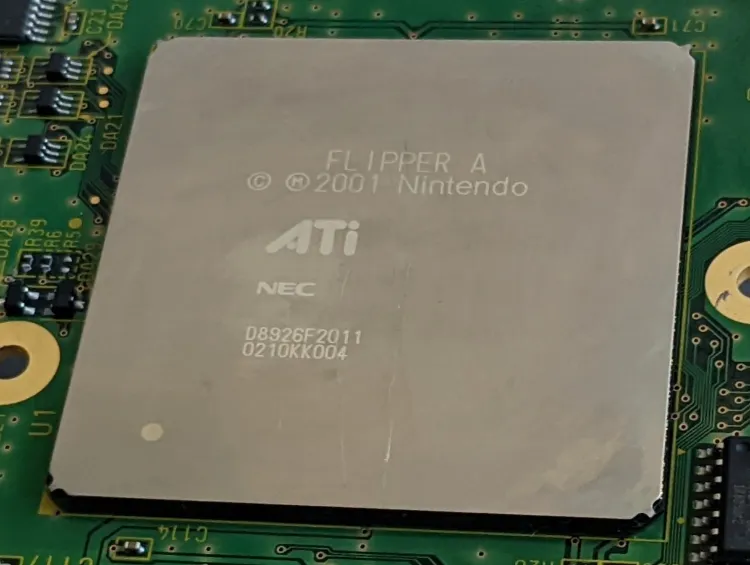
The Flipper chip on my motherboard,
The history of this console’s GPU has some interesting connections. Wei Yen, the architect behind the Nintendo 64’s SoC (the RCP), later founded ArtX and secured a contract with Nintendo to develop their next-generation chip: Flipper[17].
There were lots of advancements over the previous iteration; for instance, the subsystem was severely simplified down to a single (but powerful) core.
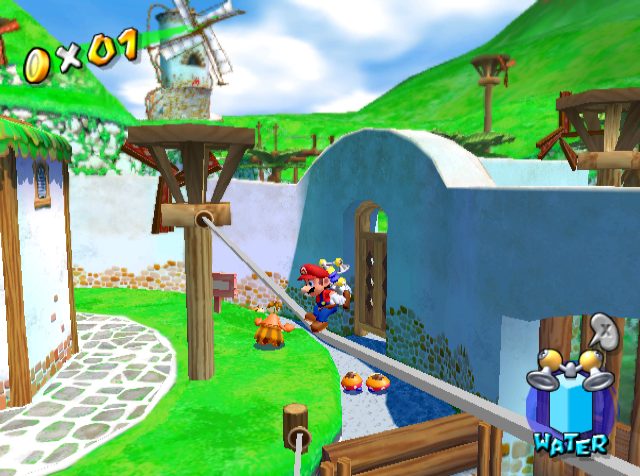
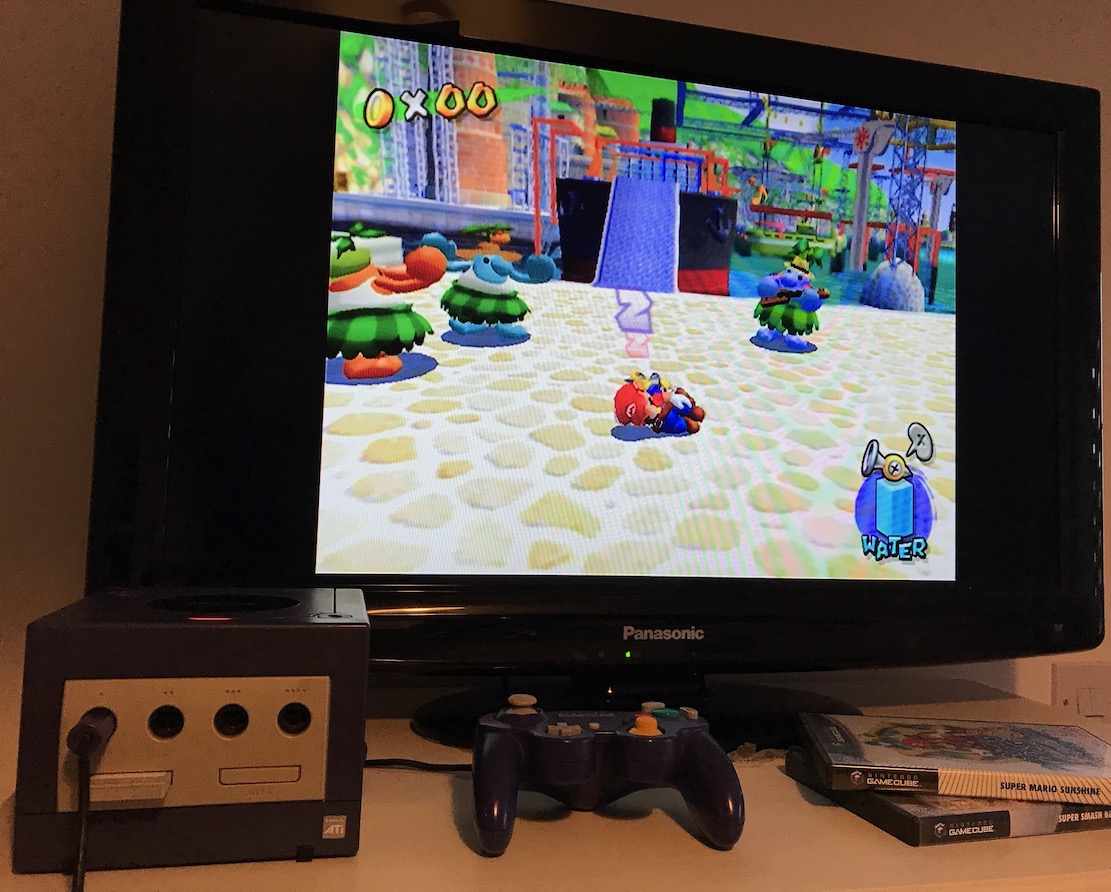
Super Mario Sunshine (2002).
Furthermore, during the development process, ArtX was acquired by ATI, which in turn was sold to AMD six years later. Hence, this is why you may notice an ‘ATI’ sticker stamped on the front of the case.
Architecture and design
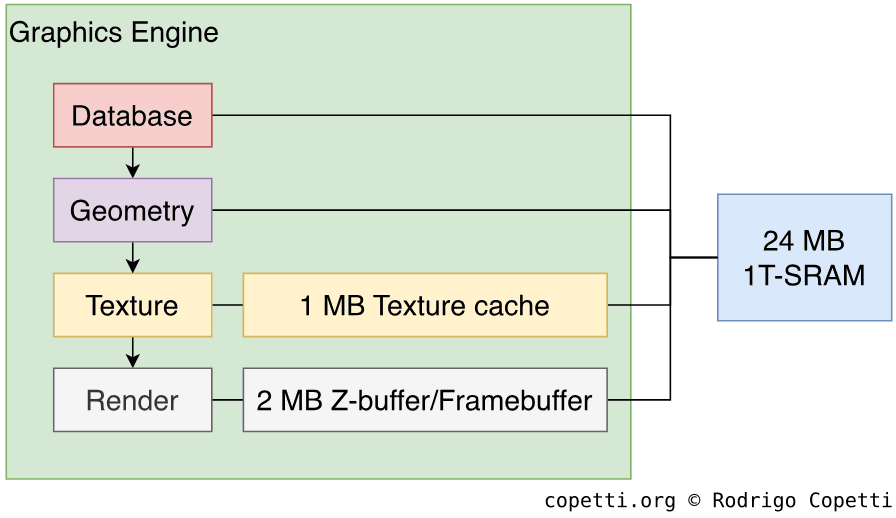
Flipper is a complex block that handles multiple services [18], so let’s focus on the graphics component for now (since it’s responsible for bringing our geometry to life). We shall call this area the GPU or Graphics Engine. For those who have read the N64 article, just letting you know that the core is now functional out of the box, so programmers won’t need to worry about injecting code to make it work. Nevertheless, there are some interesting bits that are customisable.
Pipeline design of Flipper’s GPU.
As always, in order to draw a frame on the screen, data must be pumped through the GPU’s pipeline. This passes through lots of different components that we can group into four stages:
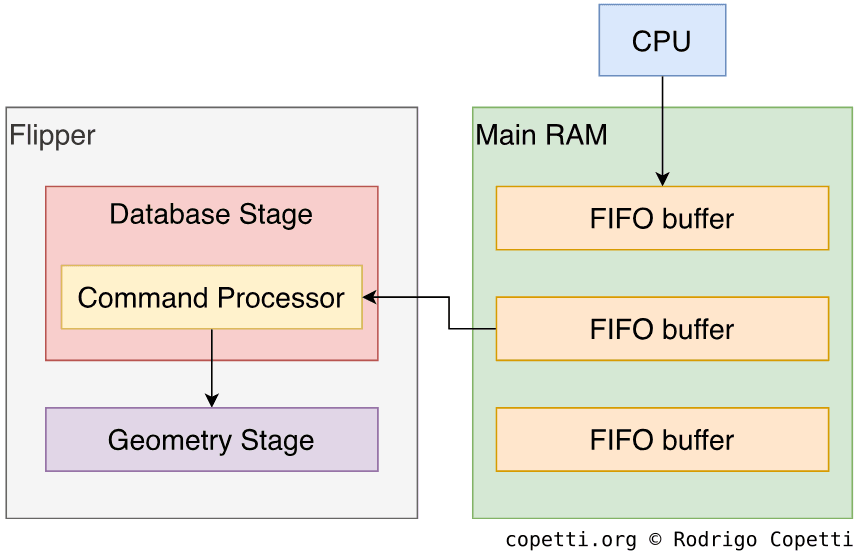
The CPU and GPU communicate with each other using a fixed-length First In, First Out (FIFO) buffer in main RAM. This is a reserved portion where the CPU writes drawing commands that the GPU reads (and eventually displays). The GPU contains a command processor that is in charge of fetching commands from the FIFO buffer.
Furthermore, the CPU and GPU don’t need to access the same FIFO at the same time. The CPU can fill a separate buffer while the GPU is reading from the first one [19]. This prevents idling.
Issuing individual commands to construct geometry can become very tedious with complex scenes. So, official libraries included tools that generated Display Lists (pre-compiled sets of FIFO commands) from the game’s assets. This chunk only needs to be copied to RAM for the GPU to display it effectively.
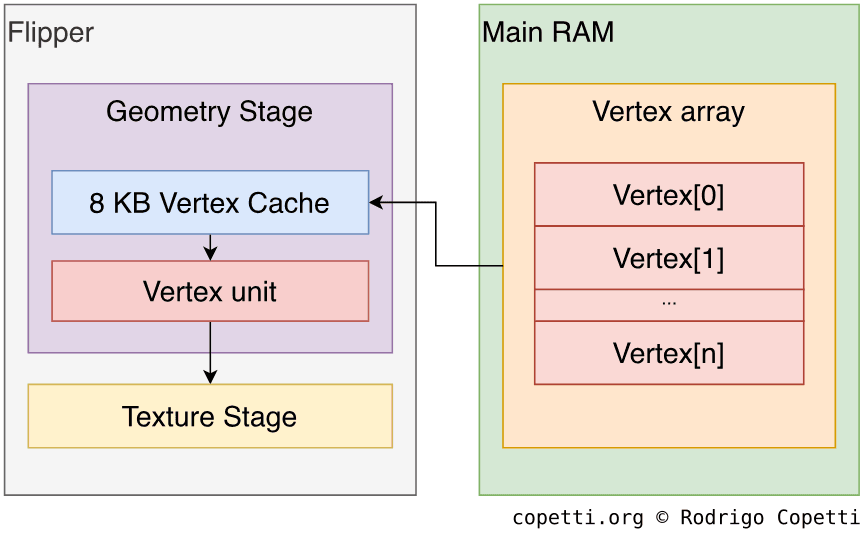
At this stage, primitives are transformed to shape the desired scenery and be ready for rasterisation. The engine uses a dedicated Vertex Unit (VU) to accomplish this task.
How the Vertex Unit operates on the data in the FIFO depends on its selected vertex mode; there are two modes available:
Direct mode: The CPU populates each FIFO entry with all required attributes (position, normal, colour, texture coordinates, or matrix index). This mode is useful when the data is already cached.
Indirect mode: The FIFO entry contains an index value that specifies where the attribute information is located in RAM, requiring the Vertex Unit to retrieve it independently. This data is structured as an array; so, for the VU to traverse it, each vertex entry must specify where the array starts (base pointer), how long each entry is (stride), and the position of the vertex (index).
Once loaded, the primitives can be transformed, clipped, lit (each vertex is assigned an RGB value that can also be interpolated for Gouraud Shading purposes), and, finally, projected.
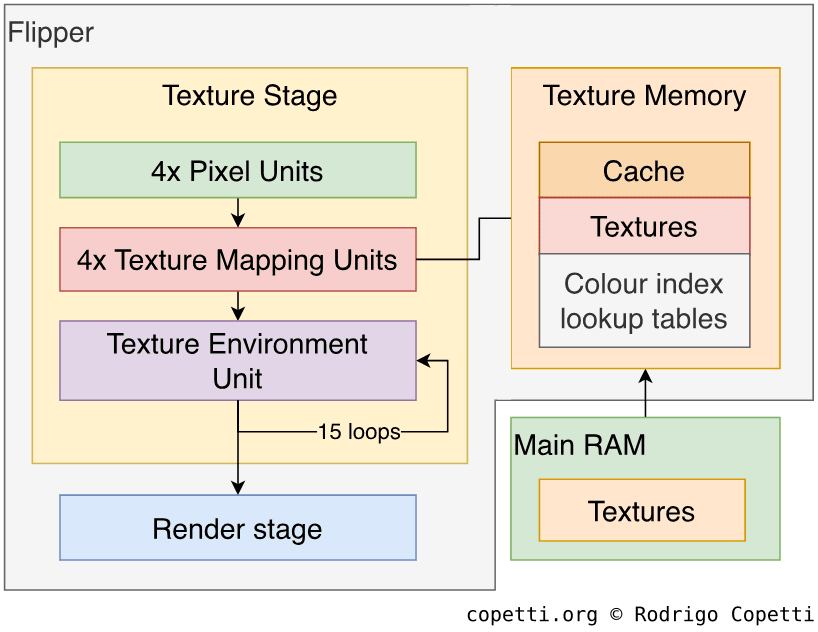
Now it’s time to apply textures and effects to our models. For this purpose, the GPU includes multiple units that process pixels. Nevertheless, texturing is a very sophisticated (yet complex) procedure; if you find it difficult to follow, just imagine a large assembly line that produces pixels. Having said that, there are three groups of units available:
Four parallel Pixel Units (also called ‘pixel pipelines’): These rasterise primitives (i.e. convert them to pixels). Having four units available enables to deliver up to 2 x 2 pixels per cycle.
One Texture Mapping Unit at the end of each Pixel Unit (giving four in total): Together, they process up to eight textures for the primitives (now merely pixels) per cycle.
The unit can also loop back to merge multiple texture layers onto the same primitive. This feature is called Multi-Texturing and can be used to achieve detailed textures, environment mapping (reflections), and bump mapping[20], for instance.
Finally, the unit also provides an early Z-buffer, mipmapping (processing a downsized texture instead, based on the level of detail), and anisotropic filtering (a welcome improvement over the previous filters that provides greater detail with textures at oblique angles).
Texture Environment Unit or ‘TEV’: A very powerful and programmable 16-stage colour blender. It basically combines multiple texels (made of lighting, textures, and constants) to achieve an immense amount of texture effects that are applied to the polygons.
The unit works by receiving four texels that are then processed based on the requested operation. Afterwards, it can feed the resulting texels back as new input, allowing the unit to perform a different type of operation on the previous result at the next cycle. This ‘loop’ can last up to 15 iterations.
Each stage has 2^4 operations to choose from [21] and, considering the result can be re-processed at the next stage, there are around 5.64 × 10^511 possible permutations!
Programmers set up the TEV at runtime (meaning it can change any time), which opens the door to lots of original materials and effects.
All of this is assisted by 1 MB of Texture memory (1T-SRAM type), which can be split into cache and scratchpad memory (fast RAM). Real-time hardware decompression for S3 Texture Compression (S3TC) is also available to fit more textures into that single megabyte of memory.
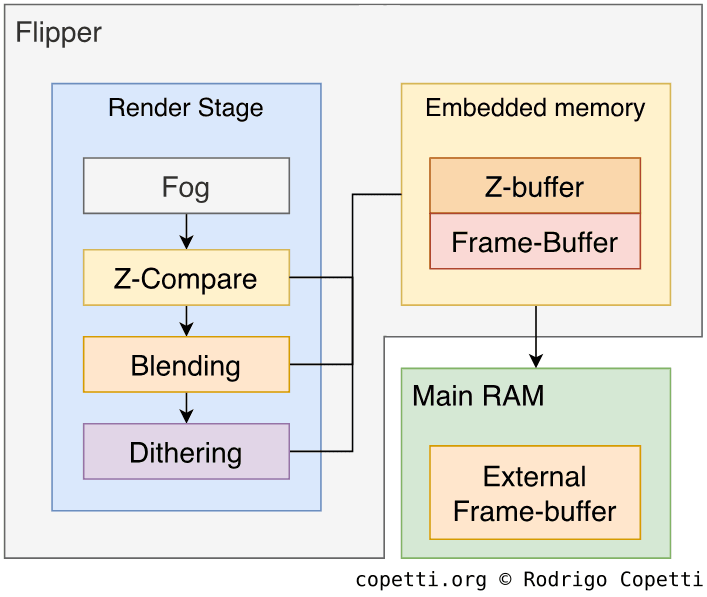
The final stage of the rendering process involves applying optional but useful touches to the scene:
Fog: Blends the last colour from the TEV with a constant fog colour to effectively simulate a foggy environment.
Z-compare: A late-stage Z-buffer test. The engine uses 2 MB of embedded 1T-SRAM for Z-buffer calculations.
Blending: Combines the colours of the current frame with the previous frame-buffer.
Dithering: As the name indicates, applies dithering to the frame.
The resulting frame is then written to the frame buffer in the embedded 1T-SRAM, but it’s still locked inside Flipper. This area is called Embedded Frame Buffer (EFB), though it also includes the Z-buffer. The EFB has a fixed resolution of 640 x 528 pixels, and games may decide to only use a part of the EFB, or adopt many passes to build a larger frame.
Thus, to display the new frame on our TV, it must be copied to the External Frame Buffer (XFB) [22], which is then picked up by the Video Interface (VI). In between, the copy process can apply effects like:
Anti-Aliasing. The EFB instead stores three 640 x 264 frames rendered with slightly different pixel positions [23]. Then, during the copy process, pixels are averaged. The result is a frame with smoother edges and fewer artefacts.
As the EFB’s dimensions are halved, this requires two passes to render a single frame at the original resolution.
Nintendo called this anti-aliasing technique supersampling (SSAA), even though in modern graphics terminology this is closer, but not identical, to multisampling (MSAA).
Vertical deflickering to smooth sudden changes between adjacent pixel rows (which, ultimately, become scanlines).
RGB to YUV conversion, a similar format that occupies less space in memory.
Y-scaling, to vertically scale the frame.
It’s worth mentioning that the XFB area can also be manipulated by the CPU. This enables it to combine previously rendered bitmaps with the recently rendered frame. It also facilitates scenarios where games need to render highly colour-rich frames that can’t fit in the EFB; such frames are rendered in parts and merged by the CPU afterwards, all while remaining in-sync with the Video Interface.
It’s time to put all of this theory into perspective. Take a look at how programmers adapted their previous game designs to take advantage of the new graphics capabilities of this console.
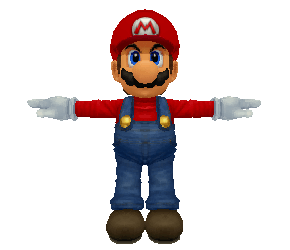
The famous Super Smash Bros. Mario model, which had to be stripped of its polygons to fit in a more constrained environment, was completely redesigned for the GameCube, evolving from plain faces to wrinkled sleeves.
Wireframe
Surface
Textured
Tap to enable interaction
Super Smash Bros (1999) for the Nintendo 64. 320 triangles.
Wireframe
Surface
Textured
Tap to enable interaction
Super Smash Bros. Melee (2001) for the GameCube. 4,718 triangles.
I have to say, it’s really impressive how much detail has been gained in just two years, eh?
In this instance, Sonic Team had already designed a Sonic model for their own console, but after porting their game to the GameCube, they were able to increase the polygon count and amount of detail.
Wireframe
Surface
Textured
Tap to enable interaction
Sonic Adventure (1999) for the Dreamcast. 1,001 triangles.
Wireframe
Surface
Textured
Tap to enable interaction
Sonic DX (2003) for the GameCube. 1,993 triangles.
As you can see from the inner workings of this pipeline, (consumer) computer graphics technology has evolved to the point that programmers can now take control of certain functions within the rendering process.
The Legend of Zelda: The Wind Waker (2003).
During the same period, PC graphics cards were starting to discard fixed-function pipelines in favour of shader cores (units that execute small programs which define how pixels are operated). Flipper still contains a fixed-function GPU; however, by including components such as the TEV unit, one could argue that Nintendo provided their own shader-like solution.
One of the most notable examples of games that exploited this new methodology is The Legend of Zelda: Wind Waker, which implements a unique colour and lighting combination known as cel shading to give its textures a cartoon-like appearance.
Video output system
The GameCube’s video output design is difficult to summarise. On the one hand, it goes a step further than what the Dreamcast tried to achieve. However, much of the progress was scaled back halfway through the GameCube’s lifespan.
Anyway, let’s start with the main part. The Video Interface follows the Digital Television signal standard (supporting up to 720 x 480 or 720 x 576 resolutions, depending on the region). It also provides PAL60 and 480p output modes, which is good news so far.
The internal frame
We know that the system favours a 60 Hz refresh rate, progressive scan, and a proper 4:3 aspect ratio. The real question is whether games can in practice take advantage of these (considering we’ve already seen how PlayStation 2 titles struggled to do so). With the GameCube, one must note that the frame travels through the Embedded Frame Buffer (EFB), the External Frame Buffer (XFB), and the Video Interface (VI), before reaching the television.
The EFB has a ‘fixed’ resolution of 640 x 528 pixels, which varies if Anti-Aliasing is used. Nevertheless, developers are free to render smaller frames and stretch them horizontally as they like, or produce larger frames using multiple passes. In any case, this is enough to provide frames of 640 x 480 pixels at an acceptable rate, making it straightforward to support 480p. To give you an idea:
Super Smash Bros. Melee and The Legend of Zelda: The Wind Waker render frames at 640 x 480 [24].
The Legend of Zelda: Twilight Princess instead renders frames at 608 x 448 (I presume for performance reasons), which are then stretched to 670 x 538, or 666 x 448, depending on the region.
Notice that the aspect ratio is no longer 4:3, which would require developers to widen the field of view of the projection matrix to compensate for this distortion. However, the majority of these games always assumed 4:3 ratios nonetheless [25].
The external connections
Now that we’ve seen that most games were able to support 480p, the only question that remains is whether the video sockets would also play their part.
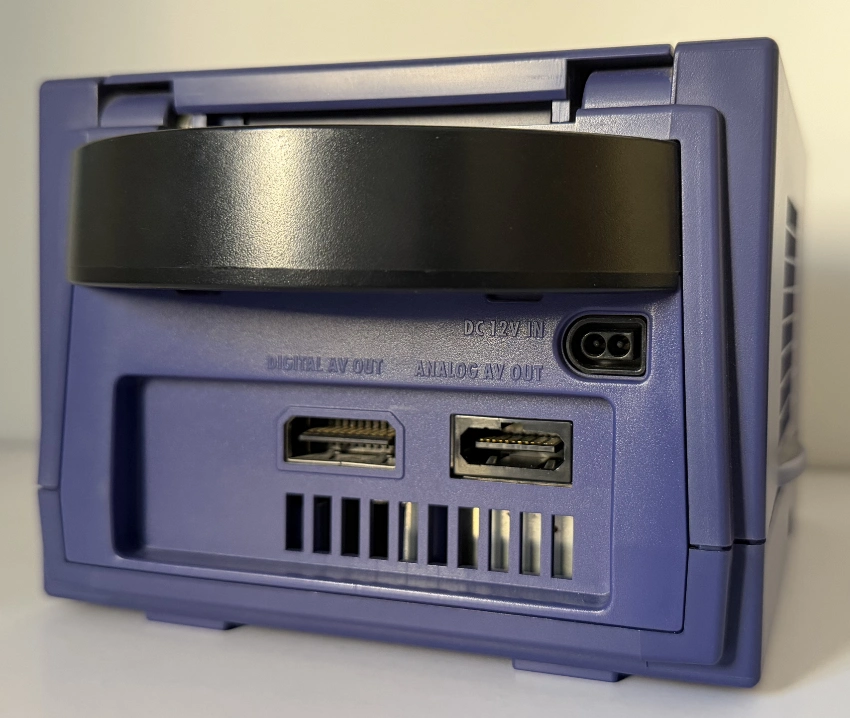
Overall, the console included not one, but two video output connectors. Their capabilities - and level of adoption - varied significantly depending on the region and revision.
Rear of the console, showing the two A/V connections and the power socket.
The right socket, Analog AV, is the successor to the good-old Multi Out, and the most popular choice. However and for some reason, the NTSC variant didn’t provide RGB signals, meaning the console could only broadcast interlaced 480 (480i) through this socket. On the other hand, the PAL version incorporated RGB (enabling enough bandwidth to send 480p) at the cost of dropping S-Video (who cares). Still, PAL games only offered the option to enable PAL60 (480i), not 480p, leaving the latter exclusive to NTSC games!
The left connector, Digital AV, was a debuting proprietary format that sends audio and video in digital form, similarly to HDMI nowadays, but using a completely different protocol. Due to the need to convert the signal to analogue, Nintendo released a tailored component cable as an extra accessory that connected to this socket. The same cable incorporated a video Digital-to-Analogue Converter (DAC) and an encoder to translate the digital signal into YPbPr (providing optimal quality). This was the only way NTSC users could enjoy progressive scan, yet not many people were asking for it back in the early noughties. Consequently, the follow-up GameCube revision (DOL-001, released around 2004) removed this socket [26]. The cable, on the other hand, is now considered some sort of a relic!
Audio
It seems the pendulum has swung back to the other side, with Nintendo now supplying dedicated circuitry that can perform audio tasks and more. Their new solution is an independent Digital Signal Processor (DSP) manufactured by Macronix that runs at 81 MHz inside Flipper [27], enabling to offload audio operations from the CPU-GPU and provide richer sounds.
Internals
General-purpose DSPs like this one are not limited to a particular type of task; it all depends on their hardware capabilities and programming. With the Macronix DSP, Nintendo arranged it so that games had to upload a microcode program before operating it (yikes!) - but fear not, as Nintendo learnt the lesson and this time provided a ready-to-use microcode program named ‘AX’ [28], making the painful era of microcode crafting just a distant memory.
Furthermore, the development kit also supplied multiple audio codecs optimised for audio streaming. Nintendo partnered with Factor 5 to bring their specialised set of audio tools, MusyX, to the official GameCube SDK [29].
Consequently, the DSP’s main job consists of performing different operations on raw audio data (e.g. decoding, adjusting volume, converting sample rates, applying 3D sound effects, filtering, adding echo, reverb, etc.) and outputting the resulting Pulse-Code Modulation (PCM) signal. It doesn’t work alone; however, the DSP delivers audio with the help of other components:
Audio RAM (ARAM): This large (16 MB) - albeit very slow - spare block stores commands and raw sound data for the DSP to retrieve. There’s plenty of space available; thus, as we learnt at the start, ARAM is also shared with the CPU and GPU.
Main RAM: Stores microcode [30] and the audio data processed by the DSP, so the Audio Interface can send it through.
The Audio Interface (AI): A 16-bit Digital-to-Analogue Converter (DAC). It mixes the final samples and sends the resulting audio signal to the TV. Considering its available bandwidth, the AI can mix up to eight stereo samples at a sampling rate of 32 kHz[31].
The main CPU: Lends some of its cycles to command the DSP and Audio Interface, as well as instructing the DMA to fill ARAM and main RAM with the necessary data.
An internal ADPCM decoder within the DSP: Accelerates the conversion of ADPCM samples into PCM, so they can be picked up by the Audio Interface.
Audio pipeline
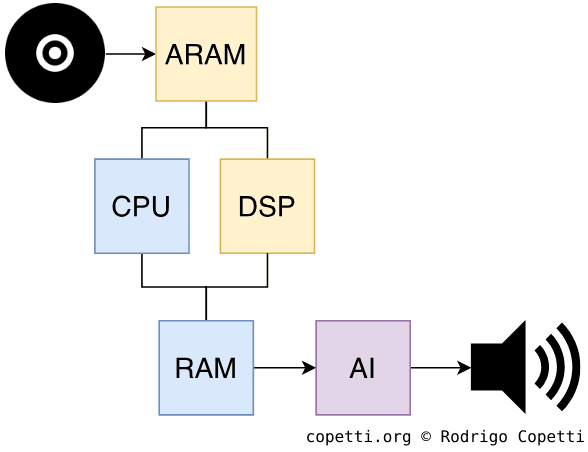
Overview of the audio pipeline
The process of generating sound works as follows [32]:
The game stores audio samples on the disc, or generates them at runtime.
The CPU commands the DMA to copy these samples to ARAM.
The CPU loads AX into main RAM and populates a list of commands that instruct the DSP on what to do with the samples.
The DSP fetches samples from ARAM, applies the required operations, and stores the resulting data in main RAM.
The AI fetches the processed samples from main RAM and outputs them through the audio signal.
New freedoms
While the previous generation made music composition no longer locked to specific waveforms, the new sound system finally frees composers from the constraints of music sequencing, a technique that the Nintendo 64 was forced to impose. Developers can now stream pre-produced music directly to the audio endpoint without problems, much like what the Saturn and PS1 accomplished years earlier.
Case study
Let me show you an example using two games, one released for the Nintendo 64 and its sequel released for the GameCube. Both have different music scores but the context (enemy battle) is the same. Take a look at how both tracks differ in sound quality, taking into account the methodology of each system (shared hardware vs dedicated).
Paper Mario (2000) for the N64. Sequenced on the fly by the RSP.Paper Mario: The Thousand-Year Door (2004) for the GC. Streamed to the DSP.
As you can hear, the DSP finally gave music composers the flexibility and richness they always asked for.
For a more direct side-by-side comparison, I’ve prepared this interactive widget that shows how composers ended up adapting their arrangements for the GameCube and its predecessor. Here, the same upbeat score is utilised for a Nintendo 64 title and a GameCube one, and the resulting comparison allows me to demonstrate (once again) the technical advantages of the GameCube’s DSP.
Nintendo 64
GameCube
Tap to enable interaction
Nintendo 64: Kirby 64: The Crystal Shards (2000). GameCube: Kirby Air Ride (2003).
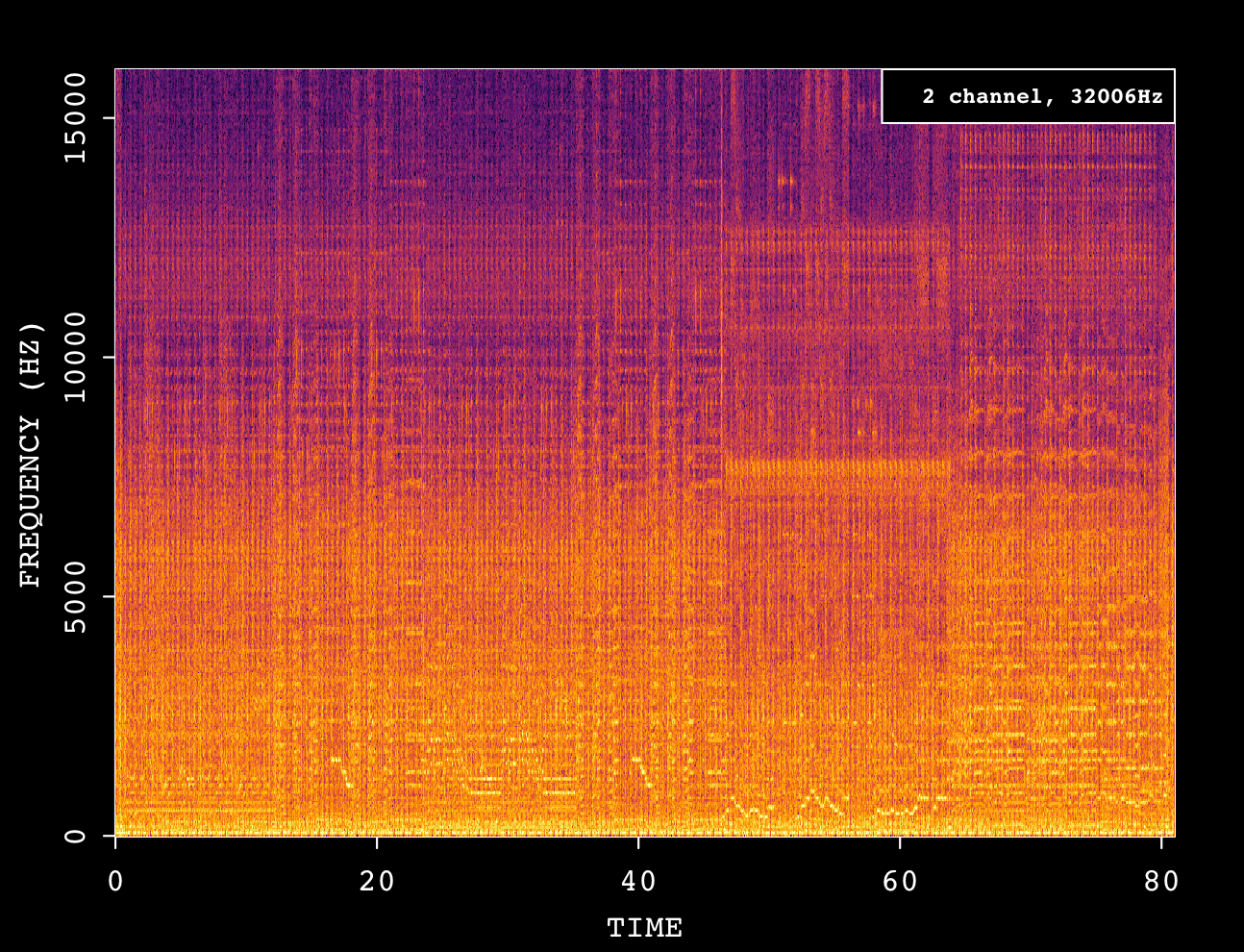
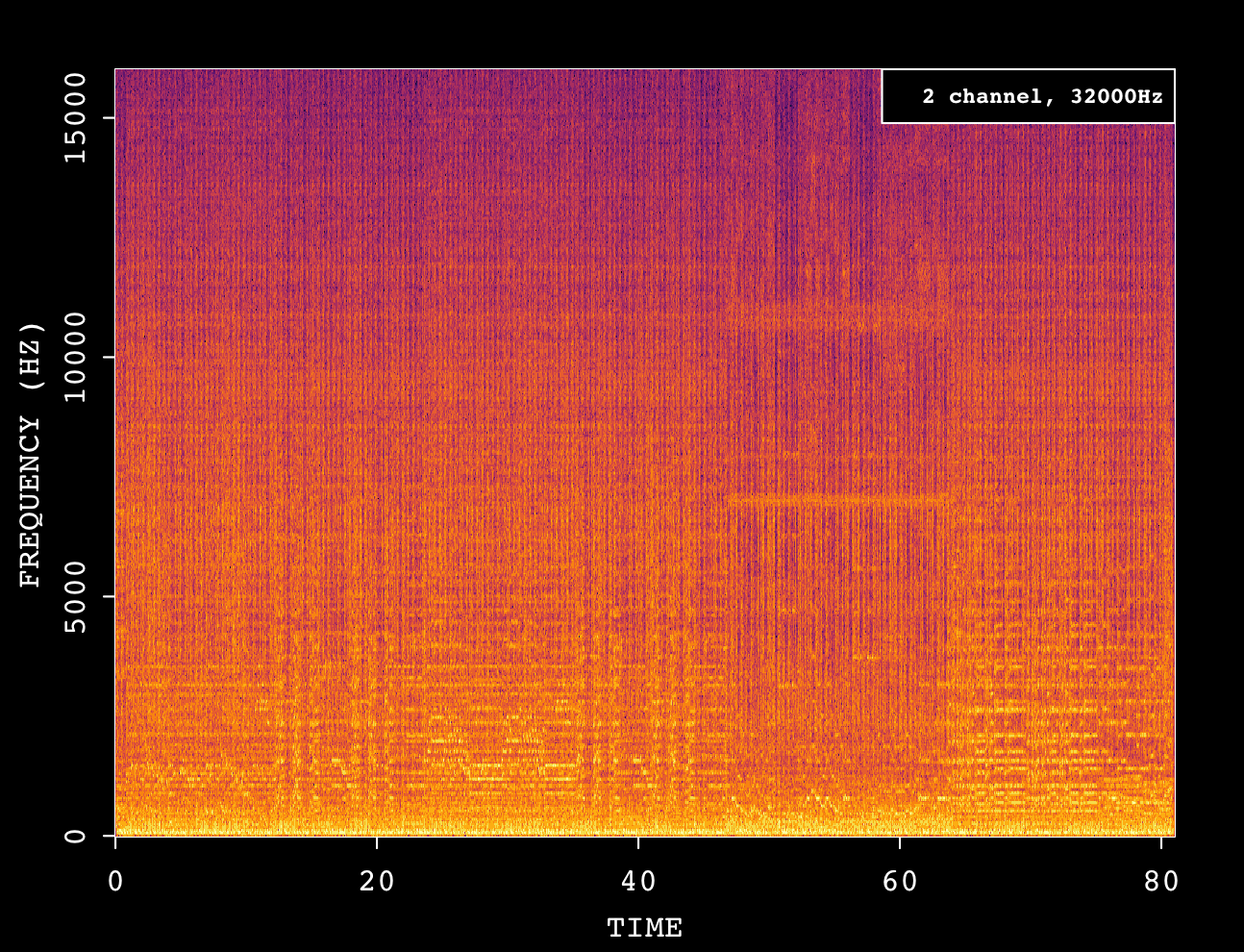
Now, to visualise what’s happening behind each track, here are the two respective spectrograms. Before I start, if you are not familiar with these kinds of charts, I recommend reading my previous NES article, in particular the audio section (where I introduced them).
Spectrogram of the PCM channel in Kirby 64: The Crystal Shards (2000).Spectrogram of the PCM channel in Kirby Air Ride (2003)
To be fair, mixed tracks are difficult to decompose in a spectrogram, but I believe I can attempt to deduce some patterns from it.
To begin with, almost all the frequency spectrum is being evenly utilised in the GameCube track, which may be attributed to the additional instruments used for accompaniment (which add harmonics and therefore fill more areas on the chart).
Finally, the amplitudes on the GameCube spectrogram look more uniformly distributed. In other words, the volume of each instrument is differently balanced and includes effects like reverb. I’m guessing the latter is what the composer originally intended while producing this score, and these types of controls are possible thanks to the fact that the GameCube supports audio streaming. Thus, composers can use any tool of choice to sequence and mix their music, as opposed to strictly depending on the console (and its limitations) to sequence and mix at runtime.
I wouldn’t say that the Nintendo 64 is completely incapable of producing the same result. However, one thing for sure is that, in the world of the Nintendo 64, every single audio function costs extra cycles and/or memory, and this can have an impact on other areas of the game. Hence the need to ration resources. On the other hand, with the GameCube’s support for large samples, one can just stream the full produced score altogether.
Beyond audio
Remember how I mentioned that the Macronix DSP is not limited to audio tasks? Well, Nintendo also programmed it to carry out the following operations [33]:
Decrypting Game Boy Advance programs (for multiboot).
‘Unlocking’ the Memory Card by issuing a challenge that, in theory, only genuine Macronix-made cards should be able to compute.
I/O
Even with its compact design, Nintendo went to considerable lengths to make its console expandable. In fact, some ports ended up unused throughout its lifespan.
Overall, the expansion slots follow an interesting design principle, where no matter how many accessories you connect, the console will always retain (or at least ‘defend’) its cubic shape.
Internal I/O
Diagram of the GameCube’s I/O design.
The engineers at ArtX also put Flipper in charge of interfacing the CPU with the rest of the system. Thus, in addition to handling sound and graphics, Flipper also houses a complex circuit named Northbridge that provides the following abstractions [35]:
Audio Interface (AI): Connects to the Audio Encoder.
Video Interface (VI): Connects to the Video Encoder.
Processor Interface (PI): Connects to the CPU (Gekko).
Disk Interface (DI): Connects to the DVD controller, which contains enough hardware to be considered an independent computer in its own right.
Serial Interface (SI): Connects up to four controllers using a proprietary serial protocol.
External Interface (EXI): Connects external accessories, Memory Cards, the Boot ROM, and the Real-Time Clock (RTC). It uses an SPI-like protocol to connect these devices through a single serial node.
Along with these, each interface exposes a set of registers that alter some of its behaviour.
External I/O
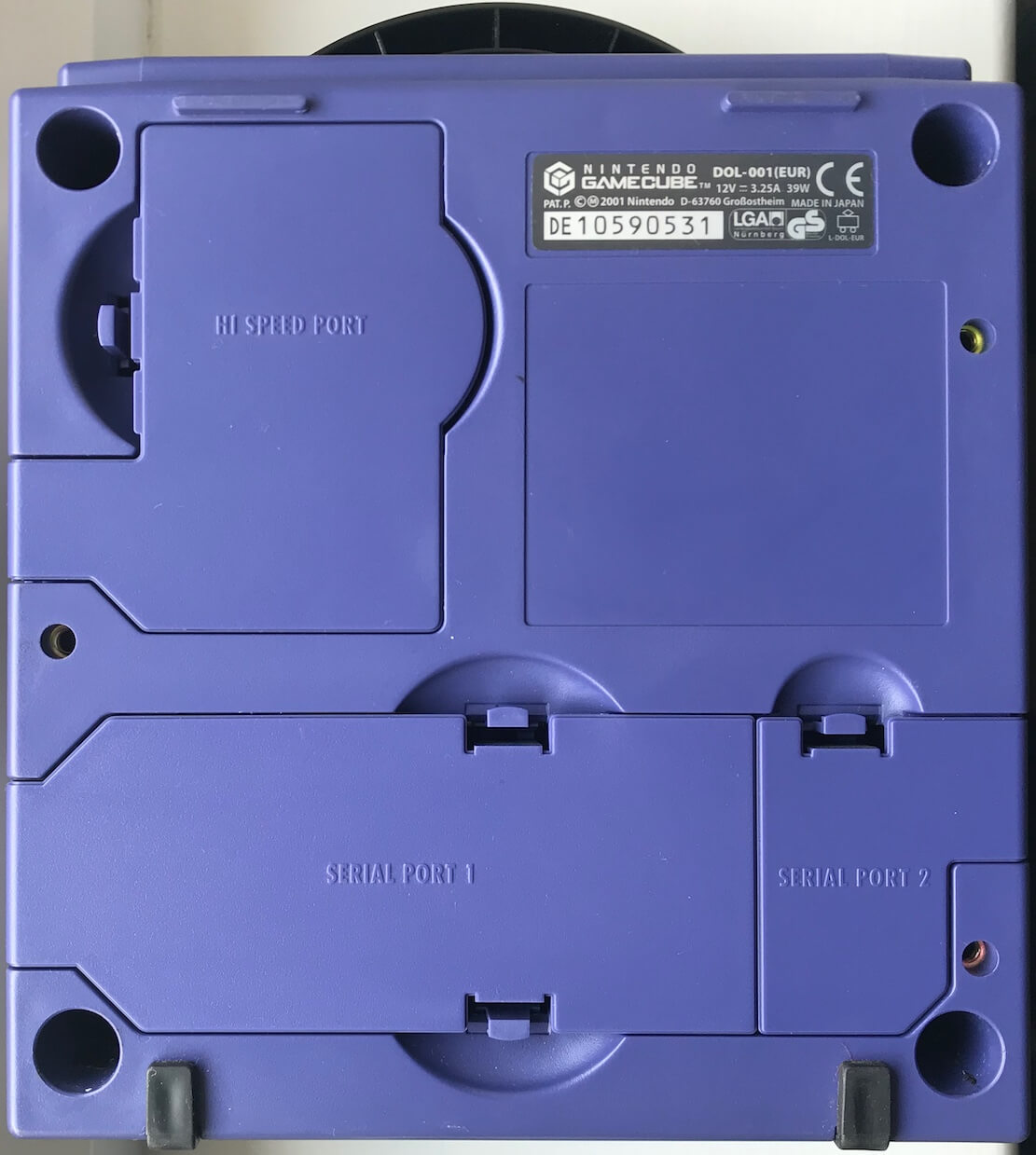
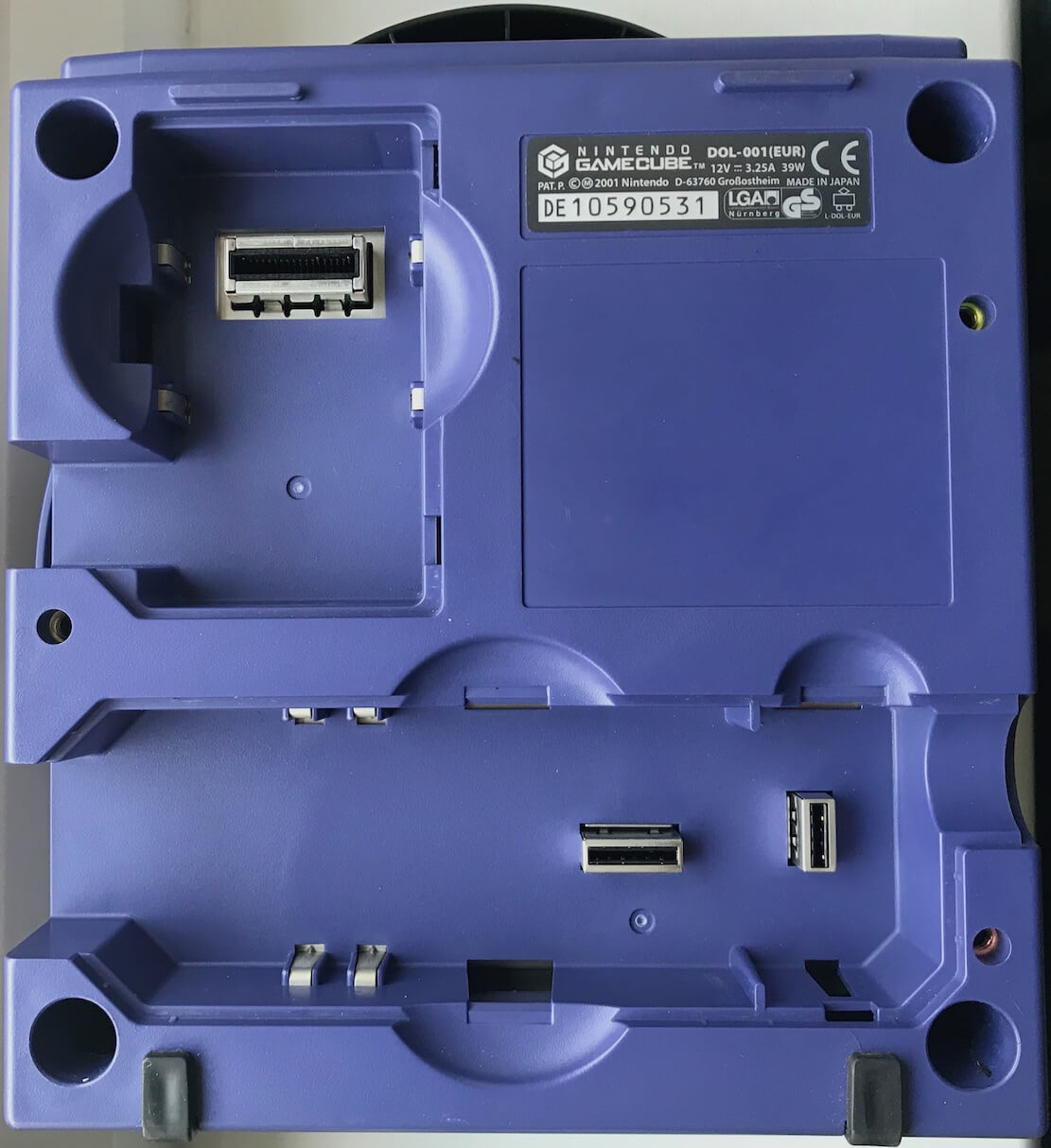
The bottom of the GameCube’s case hides three external sockets for connecting interesting widgets.
All accessory ports are covered by default.Uncovered accessory slots.Bottom of the case.
Interestingly, each socket, albeit similar, has a differently sized space allocated to it, restricting the type of accessories that can be connected. For instance, the two ‘serial ports’ are technically identical (i.e. both rely on a 32 MHz serial bus), yet, they come with physical differences:
Serial Port 1 has a larger space allocated, which is intended for the official Modem and Broadband adapters.
Serial Port 2 is significantly restricted, and no official accessory ever utilised this port, but you may find some third-party accessories that provided debugging tools.
Both serial ports are operated through the EXI stack.
Unusual I/O
I still haven’t mentioned the socket adjacent to the serial ports: the Parallel Port. This one happens to be much faster - in other words, it uses an 8-bit bus running at 80 MHz, compared with the serial/1-bit bus at 32 MHz - which explains why Nintendo called it the Hi-Speed Port. But its most unusual feature is that it’s not connected through EXI, but through Audio RAM!
The Parallel Port’s only official use to date is with the famous Game Boy Player, which attaches to the underside of the GameCube, effectively acting like an extra floor. The Player bundles the hardware needed to natively execute Game Boy and Game Boy Advance games. It also handles the bulk of the processing itself, then sends the resulting video frames and audio data to ARAM. The GameCube subsequently forwards this data to the appropriate components for display and audio playback.
An interesting second controller
You may remember that the Game Boy Advance supported a variant of the Link cable called GameCube-Game Boy Advance Link cable. This plugs into one of the GameCube controller ports, allowing games to upload small programs to the GBA and treat it as a special controller. This is an interesting capability that opened the door to unique interactions and content in certain games.
Operating System
Upon switching on the console, the CPU looks for a program located at address 0xFFF00100[36]; this is Gekko’s reset vector. Consequently, it reads from a neighbouring 2 MB Boot ROM[37] which contains an operating system called Dolphin OS. This takes care of initialising the hardware and provides convenient system calls and global variables for games to use. Titles developed using the official SDK will implicitly invoke these calls during low-level operations.
The iconic GameCube logo, shown after the splash animation finishes.
The Boot ROM contains two programs, loaded sequentially as part of the boot process [38]:
Bootstrap: Initialises the hardware and loads the next stage.
Initial Program Loader (IPL): Loads Dolphin OS and the interactive shell.
The remaining space is used to store fonts that games may use, although few titles have ever taken advantage of this.
Interactive shell
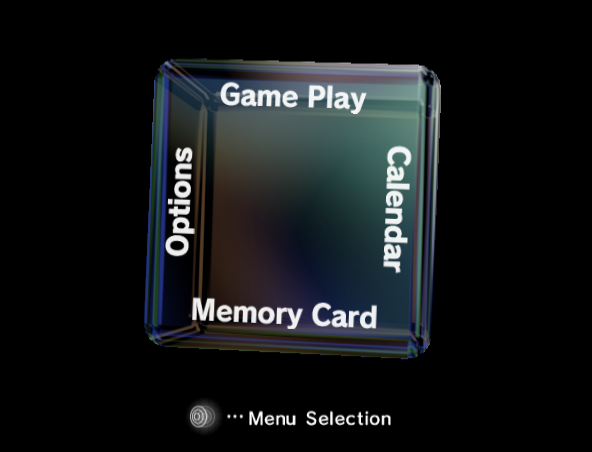
Once the boot process finishes, the OS proceeds to display an interactive interface commonly referred to as the Main Menu.
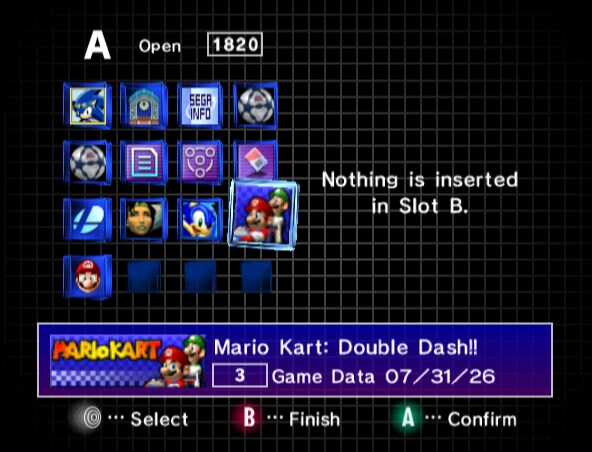
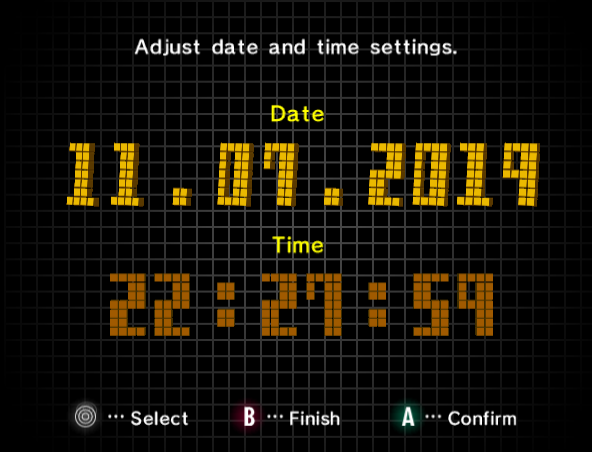
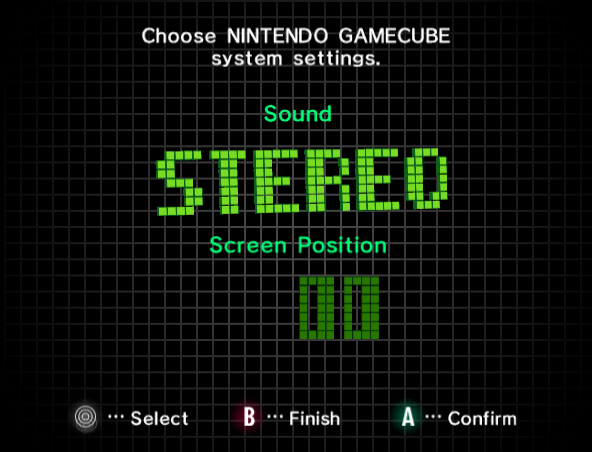
The Main Menu, enabling the user to interact with different settings using a two-dimensional cube-based navigation system.Saves page.Clock settings page.Sound settings page.The GameCube’s interactive shell.
This program is responsible for displaying the familiar splash animation (the wee cube drawing the GameCube logo) and loading the game if one is inserted. In the absence of a valid disc, the menu provides a simple cube-shaped menu with various options to choose from:
Change date and time.
Load a game from the DVD drive.
Manage save data on any Memory Card.
Change sound settings and screen position.
Games
Nintendo provided developers with a wide range of resources to assist (and encourage) the development of games for their console [39]:
The Dolphin Software Development Kit (SDK): The official collection of APIs and useful libraries, including the GX library for programming Flipper’s GPU.
C and C++ compilers.
Debuggers and test tools: Meant for use with an official development kit.
Cygwin, to replicate the UNIX environment (which some tools depended on) on Windows.
CodeWarrior: The de facto Integrated Development Environment (IDE) back in the day.
Various assistance tools, such as MusyX (a set of audio tools), texture editors, display-list exporters, USB programmers, and so forth.
Tons and tons of written documentation.
Specialised development hardware
In addition to software, the company supplied different hardware kits (which ranged in price), both before and after the console was publicly released.
Probably the most popular tool worth mentioning is the Dolphin Development Hardware (DDH). It consisted of a PC-like tower housing the GameCube’s hardware, along with extra I/O for assisting development [40]. The DDH was mainly used as a debugging station while the game itself was being developed on a PC running Windows NT 4.0.
Medium
This is the moment Nintendo finally embraced optical media… albeit with a proprietary format. The GameCube’s optical drive reads a modified variant of the miniDVD, called GameCube Optical Disc (GOD). The miniDVD itself is a miniaturised version of the traditional DVD, measuring half the diameter and holding around 1.4 GB of data [41].
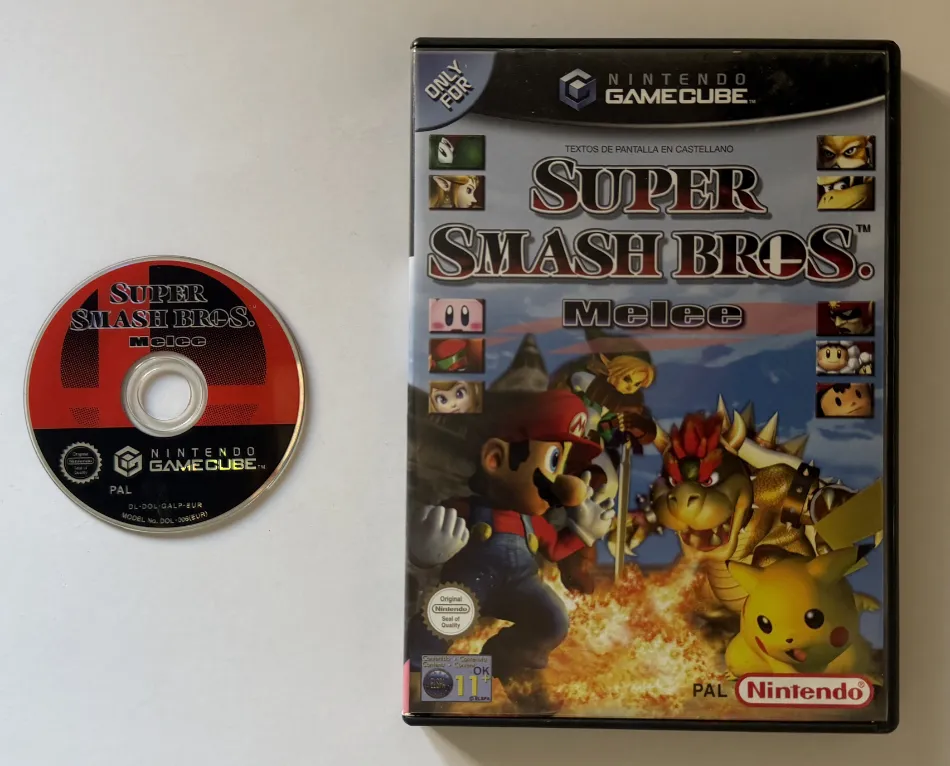
My Spanish copy of Super Smash Bros. Melee.
It’s fair to say Nintendo didn’t intend for this console to become some sort of media centre hub, unlike its competition. And whilst this may have alienated certain consumers who preferred a system capable of playing DVD movies, it also allowed Matsushita to tailor the drive’s performance and security to the console’s needs. For instance, the reader operates in a Constant Angular Velocity (CAV) mode, meaning that data is read faster towards the outer edge of the disc (3.125 MB/s) and slower towards the centre area (2 MB/s). This differs from Constant Linear Velocity (CLV) systems (used by traditional readers), in which the disc’s speed varies to maintain a constant data rate (critical during the early days of audio CD playback, for example).
Persistent storage
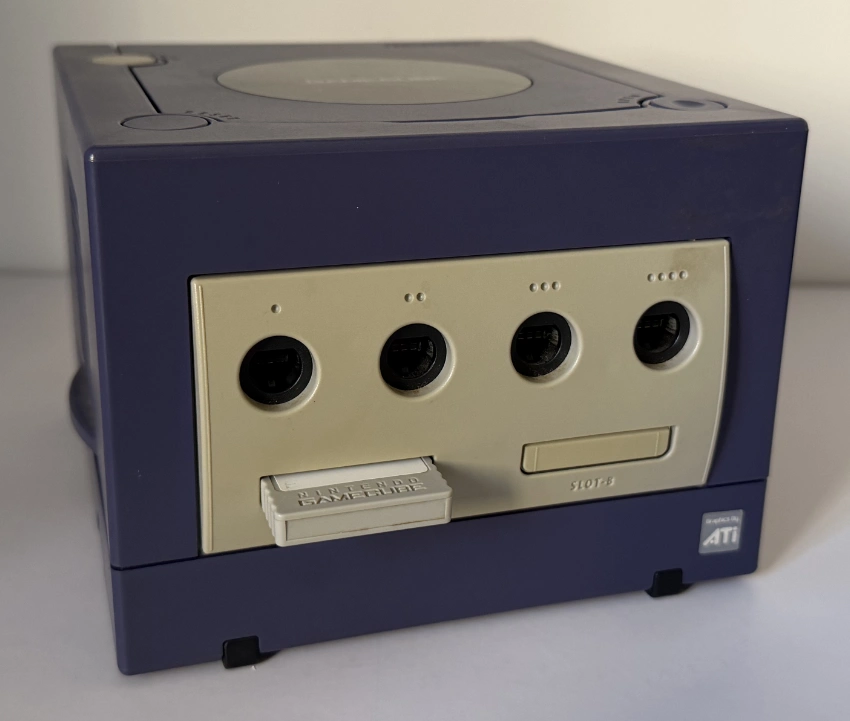
Front of the console, with a Memory Card inserted into Slot A.
Game saves are stored on a proprietary external accessory known as Memory Card. Official cards were manufactured exclusively by Macronix and bundled flash ROM [42]. Nintendo used ‘blocks’ as the unit of storage, where 64 blocks equalled 4 Mbits (512 KB). The largest official memory card available had a capacity of 2048 blocks (16 MB).
Online Platform
Well, unlike the enthusiasm some competitors poured into the emerging online services, Nintendo only offered two optional accessories (a modem and an Ethernet adapter) to access the World Wide Web, thereby leaving developers to their own devices if they wanted to provide any form of online content [43]. Consequently, game studios were solely responsible for deploying the necessary internet infrastructure.
As a result, while online gaming was still a possibility on this console, it never gained much traction, with only a handful of games attempting to leverage this.
Anti-Piracy and Homebrew
Nintendo had been in the console business for quite some time, so it’s no news that they upped their security measures to keep users away from running unauthorised software or games outside the designated region. The stakes were now higher thanks to the adoption of miniDVDs and the new range of I/O ports, which only made the attack surface more interesting.
Overall, we can organise the security implementations into two groups: the disc’s copy protection and the main system’s security.
The DVD controller
Even though this was Nintendo’s first console to adopt the optical disc as its primary medium, that didn’t mean game piracy was going to be easy.
Overall, the DVD subsystem can be imagined as a fortress that can only be entered using a series of commands. The disc controller houses its own proprietary CPU, firmware, and RAM; and will take care of authenticating and decrypting the disc without Gekko’s involvement. By design, if a disc fails these checks, no command issued by the main CPU should convince the controller to read the disc otherwise.
In terms of the medium itself, after a GameCube Optical Disc is mastered at the factory, it is further protected by inserting the following ‘anomalies’, which conventional DVD burners can’t replicate [44]:
Seven ‘marks’ around the disc, each containing 68 zeroes. This is a deliberate deviation from the DVD specification, particularly in relation to the Eight-to-Fourteen Modulation.
Encrypted data in the Burst Cutting Area (BCA). While only storing 188 bytes of information, this data can be decrypted only by the GameCube’s drive and encodes the locations of the seven marks.
The drive then reads the BCA information and compares it with what it finds in the main disc area. If the marks are located, the disc is considered valid. Afterwards, the GameCube’s operating system reads the game’s metadata to enforce region locking[45].
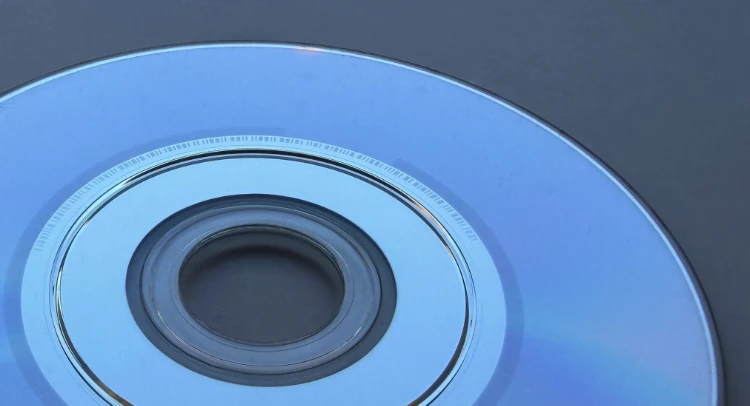
A close-up of the GameCube disc, notice the BCA area near the centre.
Moreover, the disc’s user data (containing the game) is scrambled using exclusive OR (XOR) operations; the drive reconstructs the data on the fly using the stored ‘Disc ID’ value [46]. This is merely an obfuscation technique designed to obstruct piracy efforts.
Defeat
As with any cat-and-mouse game, it was just a matter of time before third-party companies successfully reverse-engineered the controller and subsequently manufactured commercial products:
Discs with ‘valid’ BCA and marks engraved, such as Datel’s Freeloader and Action Replay[47].
Hardware designed to trick the reader into reading burned discs. Given the hacking history of this console, there’s a unique distinction between modchips (which alter the console’s OS [48] - I explain more in the next section) and drivechips (which fiddle directly with the disc controller [49]).
It’s worth pointing out that neither type can magically make a conventional DVD fit inside the console without physically modifying the case! Hence, the unusual size of miniDVDs served as another deterrent.
Later accessories that allowed users to run homebrew programs through the I/O ports, such as Datel’s SD Media Launcher, which relied on the Memory Card port.
More recently, Optical Drive Emulators (ODEs) have been developed to bypass the disc drive altogether. Thanks to their self-contained nature and ease of use, they have since attracted considerable attention.
The main system
Be that as it may, the early years of the GameCube hacking scene saw little progress in cracking the DVD controller [50]. Meanwhile, another group was working on exploiting the external I/O ports to load homebrew programs. But how could this be feasible without an entry point? Well, without access to the disc drive, the remaining avenue focused on taking control of the program currently being executed: either the operating system or the game.
Hijacking the game
Some games like Phantasy Star Online featured a peculiar set of online features. For instance, the game could be updated by downloading a new executable (in the form of a DOL file) from the company’s servers. However, the transfer didn’t involve any authentication or encryption protocol to protect itself - in other words, it was a man-in-the-middle attack waiting to happen.
Long story short, hackers discovered that by instantiating a fake server and altering the DNS settings, the GameCube would just download (and execute) whatever DOL the custom server provided. This was packaged in the form of PSOload[51], and it only required a genuine copy of the game and the optional Ethernet/broadband adapter.
Hijacking the operating system
PSOload and similar methods were inexpensive but tedious in practice, so attention shifted towards a more seamless process involving the GameCube’s operating system. In other words, could the contents of the Boot ROM be altered to load homebrew automatically?
As a matter of fact, Nintendo had anticipated that their operating system would become a target. Thus, they protected it in the following ways:
Using custom components: The Boot ROM is a unique chip made by Macronix that also houses the Real-Time Clock (RTC). Furthermore, it’s accessed through a serial interface managed by EXI.
Adopting encryption: The contents of the ROM are scrambled using XOR operations, resulting in a symmetric encryption system that relies on a key - called ‘keystream’ - that changes based on the previous data decrypted [52]. Macronix housed circuitry that decrypts the bootstrap code, while the EXI controller (inside Flipper) decrypts the IPL portion.
Defeat
Nintendo’s implementation carried two major flaws, which ultimately allowed researchers to extract the Boot ROM contents in full [53]:
The same keystream was used to encrypt both NTSC and PAL Boot ROMs. Thus, an XOR operation on the encrypted PAL and NTSC variants can be used to derive the unencrypted PAL and NTSC Boot ROMs. This vulnerability is commonly known as a ‘two-time pad weakness’ or ‘key-reuse attack’.
With the use of a logic analyser, researchers discovered that when the EXI interface sends read requests to the boot ROM, it ‘accidentally’ includes past unencrypted data.
This prompted hackers to build a custom ROM paired with a CPLD board programmed to understand the EXI protocol. The ROM’s code then forced the CPU to extract the unencrypted contents of the Boot ROM. Consequently, diverse groups managed to build ‘IPL replacements’ that allowed the console to execute homebrew programs. The first such attempt was released by tmbinc in 2003, followed by commercial products like Viper GC[54].
Later developments discovered that a series of commands sent to the disc reader, originally designed for debugging purposes, could successfully unlock it to read conventional DVDs, thereby opening the door to piracy. A chip combining an IPL replacement with disc-unlocking code became known as a GameCube modchip.
That’s all folks
My old GameCube, recently rescued from the attic. When I bought it back in 2009, I only needed the controller to use on the Wii (back then, it was cheaper to buy the whole second-hand lot!).
Well, this is it, the 10th article!
I really tried to set a rough limit on the length of this article, but you have to understand, technology has become so complex that if I accidentally skip anything important, the whole topic becomes impossible to follow.
Anyway, I’d like to thank the #dolphin-dev IRC community for helping me understand the complicated pipeline of Flipper’s GPU. These guys have been developing the reference GameCube emulator for quite some years now, and it’s really impressive how much they’ve had to figure out along the way.
And finally, please consider contributing if you found it an interesting read. I strive to make it as comprehensive as I can, but in the process, I lose track of how much time they end up taking. Nonetheless, I still find it a good investment.
Until next time! Rodrigo.
Contributing
This article is part of the Architecture of Consoles series. If you found it interesting then please consider donating. Your contribution will be used to fund the purchase of tools and resources that will help me to improve the quality of existing articles and upcoming ones.
You can also buy the book editions in English. I treat profits as donations.
A list of desirable tools and latest acquisitions for this article are tracked in here:
### Interesting hardware to get (ordered by priority)

- Any IPL mod (?)

### Acquired tools used

- (While ago) Gamecube with controller (£20) and some games (if I remember correctly, no more than £20...)
This work is licensed under a Creative Commons Attribution 4.0 International License. You may use it for your work at no cost, even for commercial purposes. But you have to respect the license and reference the article properly. Please take a look at the following guidelines and permissions:
Article information and referencing
For any referencing style, you can use the following information:
Title of article: GameCube Architecture - A Practical Analysis
I only ask that you at least state the author’s name, the title of the article and the URL of the article, using any style of choice.
You don’t have to include all the information in the same place if it’s not feasible. For instance, if you use the article’s imagery in a Youtube video, you may state either the author’s name or URL of the article at the bottom of the image, and then include the complete reference in the video description. In other words, for any resource used from this website, let your viewers know where it originates from.
This is a very nice example because the channel shows this website directly and their viewers know where to find it. In fact, I was so impressed with their content and commentary that I gave them an interview 🙂.
Appreciated additions
If this article has significantly contributed to your work, I would appreciate it if you could dedicate an acknowledgement section, just like I do with the people and communities that helped me.
This is of course optional and beyond the requirements of the CC license, but I think it’s a nice detail that makes us, the random authors on the net, feel part of something bigger.
Third-party publishing
If you are interested in publishing this article on a third-party website, please get in touch.
If you have translated an article and wish to publish it on a third-party website, I tend to be open about it, but please contact me first.
It’s always nice to keep a record of changes. For a complete report, you can check the commit log. Alternatively, here’s a simplified list:
### 2026-10-31

- Overall improvements to prepare for a book release.
- Extended Anti-piracy and Video output sections.

### 2025-04-20

- Added photograph of IBM POWER board after a quick visit to The Computer History Museum (Mountain View, California) in March 2025.

### 2025-01-06

- Added history of PowerPC (from the 808 to the 970/G5)

### 2023-02-11

- Added additional material to the audio section

### 2022-12-04

- Corrected ambiguity between Flipper (the SoC) and its internal GPU. See https://github.com/flipacholas/Architecture-of-consoles/issues/150 and https://github.com/flipacholas/Architecture-of-consoles/issues/151 (thanks @phire, @Pokechu22, @Masamune3210 and @aboood40091)

### 2021-06-20

- Added 32 vs 64 bits paragraph
- Expanded audio section

### 2021-05-15

- Added MMU+ARAM section
- Added memory layout diagram
- Improved 'Sources' structure

### 2020-02-26

- Added mention on anisotropic filtering

### 2020-01-09

- Improved the write gather pipe explanation

### 2019-11-22

- Corrections and more info added, thanks @phire from #dolphin-dev and /r/gamecube !

### 2019-11-20

- Corrections here and there

### 2019-11-19

- Public release!
Rodrigo Copetti
I hope you have enjoyed this article! If you want to know more about the author tap here and if you would like to support him tap here instead